ARCOLE format
Introduction
This article provides a detailed procedure for configuring the expense export for your expense claims.
The aim is to enable you to configure or know how to modify the data appearing in the export file generated by Eurécia and intended for your accounting software.
Prerequisites
The export file contains 19 fields; only seven of them require prior configuration:
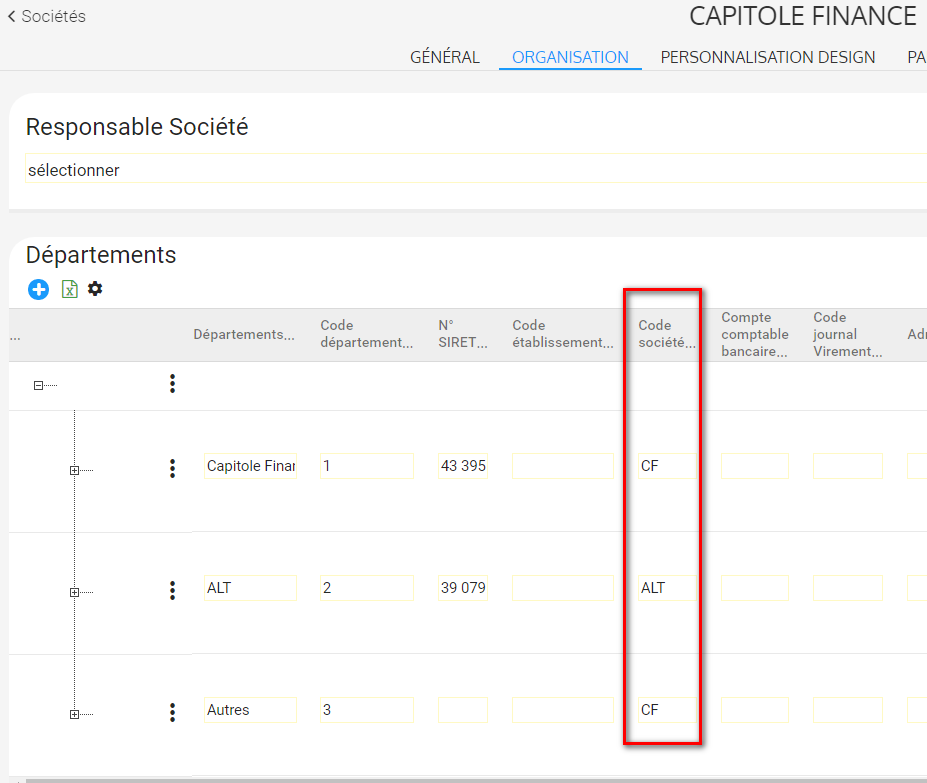
- The company code(s) defined in your accounting software.
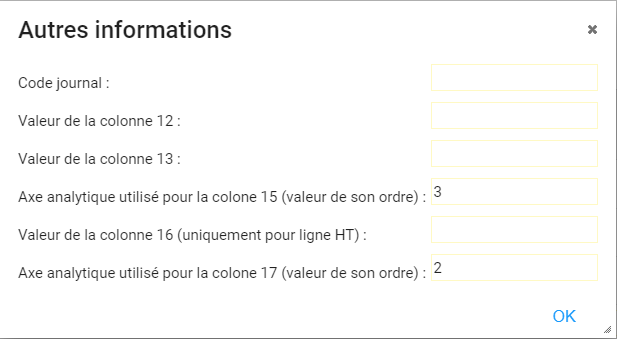
- Journal codes: the journal code referenced in your accounting software.
- MOV_INITIAL value (column 12): Can be modified by the EURECIA teams
- MOV_TRANSAC value (column 13): Can be modified by the EURECIA teams
- MOV_A2 value (column 15): Can be modified by the EURECIA teams
- MOV_A3 value (column 16): Can be modified by the EURECIA teams
- MOV_MAT value (column 17): Can be modified by the EURECIA teams
Configuration
1. The company code(s) defined in your accounting software.
Access: Admin Area > General settings > Company record -> Organisation tab -> Departments -> Company code
2. Configuration options when setting up the connector.
The procedure is complete
 The export described in this guide allows all the elements required for accounting to be sent to Arcole.
Technical information regarding the file format expected by your payroll application:
- File name: EURECIA_ARCOLE_YYYY-MM-DD.csv
- YYYY-MM-DD = day, month and year of the extraction
|
Type |
CSV |
|
Column separator |
Semicolon |
|
Decimal separator |
comma |
|
Number of decimal places |
two |
|
End of line |
CRLF |
File header:
A header row will be present in the file and will contain the column labels, as described in the table below.
Grouping:
- No grouping of rows will be applied to the export.
- There will be one net amount row and one VAT row (if required) for each expense.
- There is one gross amount row per VAT row if the expenses were made using a bank card (personal card or business card).
- There is one gross total row for other expenses.
Specific features:
- The Mov_Name column starts with CB if the expenses were made using a bank card (personal card or business card).
- The Mov_Name column starts with VIR in all other cases.
- There is one gross amount row per net amount row if the expense was made using a company card.
File contents:
|
No. |
Column header |
Description |
Comments |
|
1 |
Company |
Company code |
Retrieval source Eurécia company record -> Organisation -> Department -> Company code |
|
2 |
Mov_Dpt |
CB if “Company” = CF |
|
|
3 |
Journal |
Journal code |
Configurable when setting up the connector |
|
4 |
Mov_Date_Mov |
Export date |
Date selected by the customer when performing the accounting export (pop-up) The default date will be the current date |
|
5 |
Mov_Date_Init |
Expense claim date |
Date on which the expense claim was approved by the manager |
|
6 |
Mov_Name |
|
Concatenation of fields CB (if company card) or VIR (otherwise) + Expense type code + Employee structure (label) |
|
7 |
Mov_Acct |
Accounting account |
|
|
8 |
Mov_Db_Cur |
Net amount |
Only on debit rows |
|
9 |
Mov_Cr_Cur |
Gross amount |
Only on credit rows |
|
10 |
Mov_Sense |
Direction |
D = debit C = credit |
|
11 |
Mov_Cur |
Currency |
Based on the default currency of the expense claim |
|
12 |
Mov_Initial |
|
Configurable when setting up the connector |
|
13 |
Mov_Transac |
|
Configurable when setting up the connector |
|
14 |
Mov_A1 |
Analytical field (only on net amount rows) |
Concatenation of fields Field1 + Field2 + 00 |
|
15 |
Mov_A2 |
Analytical field (only on net amount rows) |
Concatenation of fields Analytical code (employee) + Absence type code + Code of the selected analytical account 2 |
|
16 |
Mov_A3 |
Analytical field (only on net amount rows) |
Hard-coded value PROPRE |
|
17 |
Mov_Matr |
Analytical field (only on net amount rows) |
Retrieval source Code of the selected analytical account 1 |
|
18 |
Mov_Tax_Code |
VAT code (only on VAT rows) |
Retrieval source Additional VAT rate code |
|
19 |
Mov_Type |
|
Hard-coded value 2 for VAT rows 1 in all other cases |
File example:


Comments
Please sign in to leave a comment.