SAGE PAYE format
Introduction
This article provides detailed instructions for configuring the expense export for your expense claims.
The aim is to enable you to configure or find out how to modify the data appearing in the export file generated by Eurécia and intended for your accounting software.
Prerequisites
The export file contains 4 fields, 4 of which require prior configuration.
- You must enter the employee number in the employee record.
- You must enter the item and the source of the "Item code" field in the toolbox.
Configuration
Access: Admin area > General settings > Employee record

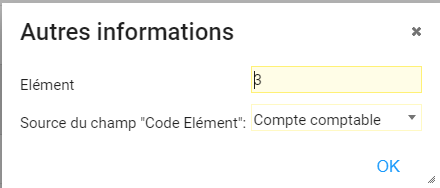
The procedure is complete
 The export described in this guide enables all the items required for accounting to be sent to Sage Paye.
File format
- Text file (xls extension)
- Decimal separator: comma
File contents
|
Order |
Fields |
Required |
Eurécia comments |
|
1 |
Employee number |
Yes |
Employee number from the employee record |
|
2 |
Item |
Yes |
Constant entered when setting up the connector |
|
3 |
Item code |
Yes |
If the value of the Source of the "Item code" field is set to "Constant", an additional field to be completed, "Item code", will appear in the pop-up. If the value of the Source of the "Item code" field is set to "Ledger account", the "Item code" will be populated with the ledger account in the reimbursement scale. |
|
4 |
Item value |
Yes |
Net amount to be reimbursed from expense claims, grouped by employee number |
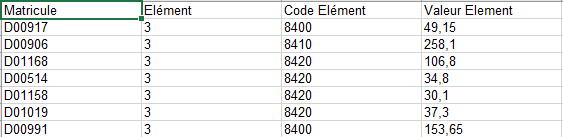
File example

Comments
Please sign in to leave a comment.