SAGE LIGNE 1000 format
Introduction
This article provides detailed instructions for configuring the expense export for your expense claims.
The aim is to enable you to configure or find out how to modify the data displayed in the export file generated by Eurécia and intended for your accounting software.
Prerequisites
The export file contains 21 fields, none of which require prior configuration.
- You can define the journal code.
- You can enter the auxiliary account and third-party account.
- You must set the VAT profile to "yes" in the toolbox.
Configuration
Access: Admin Area > General settings > Company record > Subscription tab
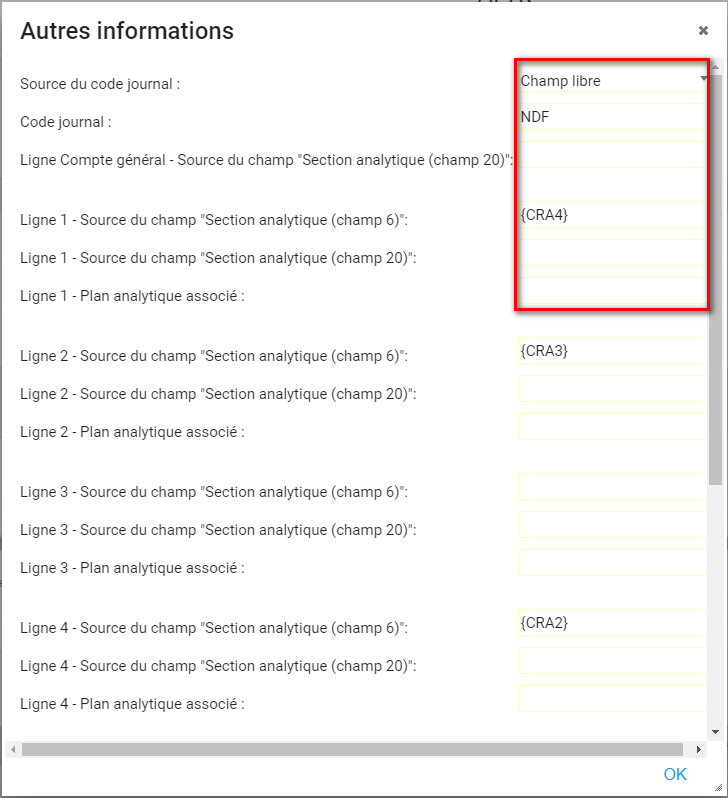
1. You can define the journal code for the company, department or structure.
2. You can define the journal code.
3. You can define the analytical code in the employee record.
4. You must set the VAT profile to "Yes".
The procedure is complete
 The export described in this guide allows all the items required for accounting to be sent to Sage Ligne 1000 Std.
File format
-
PNM file
-
One header line (optional)
-
Date format: DDMMYY
-
Decimal separator: "full stop"
File content
order |
field |
position |
length |
comment |
| 1 | journal code | 1 | 3 | To be configured in the toolbox |
| 2 | document date | 4 | 6 | Posting date to be selected at the time of export |
| 3 | document type | 10 | 2 | To be configured in the toolbox |
| 4 | general account | 12 | 13 | |
| 5 | account type | 25 | 1 | G = general; A = analytical; X = auxiliary |
| 6 | auxiliary or analytical account | 26 | 13 | |
| 7 | entry reference | 39 | 13 | Eurécia document number |
| 8 | entry description | 52 | 25 |
Prefix from the toolbox + defined in the application's translation file: {0}=expense claim description, {1}=surname, {2}=first name, {3}=period start, {4}=period end,userCurre {5}=period end,userCurre {6}=expense type {7}= analytical code2 {8}= expense claim month and year {9}= document number |
| 9 | payment method | 77 | 1 | S = none; C = cheque; V = bank transfer; E = cash |
| 10 | due date | 78 | 6 | Blank |
| 11 | direction | 84 | 1 | D = debit; C = credit |
| 12 | amount in euros | 85 | 20 | |
| 13 | entry type | 105 | 1 | N = normal (hard-coded) |
| 14 | document number | 106 | 7 | Blank |
| 15 | reserved area | 113 | 26 | Blank |
| 16 | ISO currency code | 139 | 3 | EUR = euro (hard-coded) |
| 17 | amount in currency | 142 | 20 | Amount converted into the accounting currency |
| 18 | ISO currency code of the entry | 162 | 3 | Blank |
| 19 | analytical plan/axis | 165 | 10 | To be configured in the toolbox |
| 20 | analytical section | 175 | 25 | To be configured in the toolbox |
| 21 | VAT profile | 200 | 50 | The VAT profile is configured in the supplementary code for the expense type |
Specific features
- The header line is optional and the code returned to identify the company can be customised
-
All lines are exported in euros
- If an expense is entered in another currency, Eurécia converts the amount into euros
- The export generated from Eurécia may or may not contain analytical lines (selected during configuration)
- Fields 6, 19 and 20 relating to analytics are populated with values specific to each employee and entered in Eurécia
- Field 21 relating to VAT is populated using the supplementary code in the expense type
File examples


Comments
Please sign in to leave a comment.