COMPT'OR format
Introduction
This article provides detailed instructions for configuring the export of expenses for your expense claims.
The objective is to enable you to configure or understand how to modify the data appearing in the export file generated by Eurécia and sent to your accounting software.
 The export described in this guide enables all the elements required for accounting to be sent to Compt'Or.
File format:
-
Text file (no extension)
- File name: NDFMMAAAA, MM = month of the date entered at the time of export, AAAA = year of the date entered at the time of export
- Positional file
- Date format: DD/MM/YYYY
-
Amounts
- In pence
- Right-aligned
- Padded with zeroes on the left
-
Account numbers
- Right-aligned
- Padded with zeroes on the left
File content:
File structure:
File header: 1 line identifying the journal
- 1 accounting entry line
- 1 payment due date line
- 1 analytical allocation line
File header
|
Order |
Columns |
Start |
Length |
Comments |
|
1 |
Record |
1 |
1 |
See toolbox |
|
2 |
File origin |
2 |
1 |
See toolbox |
|
3 |
Journal code |
3 |
3 |
See toolbox NDF |
|
4 |
Journal title |
6 |
30 |
See toolbox |
|
5 |
Journal type |
36 |
1 |
See toolbox |
|
6 |
Pre-journal type |
37 |
1 |
0 hard-coded |
|
7 |
Financial centraliser |
38 |
8 |
Blank |
|
8 |
Financial centraliser title |
46 |
30 |
Blank |
|
9 |
Filler |
76 |
180 |
Blank |
Accounting entry line
|
Order |
Columns |
Start |
Length |
Comments |
|
1 |
Record |
1 |
1 |
B hard-coded |
|
2 |
Entry date |
2 |
10 |
End date of the expense claim |
|
3 |
Entry currency |
12 |
1 |
1 hard-coded (Euros) |
|
4 |
General, auxiliary or financial account |
13 |
8 |
See specifications |
|
5 |
Account title |
21 |
30 |
See toolbox |
|
6 |
Account type |
51 |
1 |
See specifications |
|
7 |
Default main account |
52 |
8 |
Centralising account for the payment method Only on third-party lines |
|
8 |
Main account for the entry |
60 |
8 |
Centralising account for the payment method Only on third-party lines |
|
9 |
Main account title for the entry |
68 |
30 |
See toolbox |
|
10 |
Debit |
98 |
15 |
See specifications |
|
11 |
Credit |
113 |
15 |
See specifications |
|
12 |
Quantity |
128 |
15 |
000000000000000 |
|
13 |
Quantity type |
143 |
20 |
Blank |
|
14 |
Main label |
163 |
30 |
See toolbox Expense claim for the month on all lines |
|
15 |
Secondary label |
193 |
30 |
See toolbox |
|
16 |
Reconciliable account |
223 |
1 |
See specifications |
|
17 |
Document |
224 |
10 |
See toolbox |
|
18 |
Reconciliation |
234 |
1 |
Blank |
|
19 |
Filler |
235 |
21 |
Blank |
Payment due date line
|
Order |
Columns |
Start |
Length |
Comments |
|
1 |
Record |
1 |
1 |
C hard-coded |
|
2 |
Due date |
2 |
10 |
Date entered at the time of export |
|
3 |
Document |
12 |
10 |
Same document number as for the entry line |
|
4 |
External reference |
22 |
31 |
Blank |
|
5 |
Payment method |
53 |
1 |
See toolbox |
|
6 |
Bank details |
54 |
1 |
See toolbox |
|
7 |
Bank journal |
55 |
3 |
Blank |
|
8 |
Document status |
58 |
1 |
See toolbox |
|
9 |
Accounting entry date |
59 |
10 |
End date of the expense claim |
|
10 |
Debit |
69 |
15 |
Debit corresponding to the accounting entry line |
|
11 |
Credit |
84 |
15 |
Credit corresponding to the accounting entry line |
|
12 |
Date of last reminder |
99 |
10 |
Blank |
|
13 |
Reminder level |
109 |
1 |
0 |
|
14 |
Reminder comment |
110 |
146 |
Blank |
Analytical allocation line
|
Order |
Columns |
Start |
Length |
Comments |
|
1 |
Record |
1 |
1 |
D hard-coded |
|
2 |
Analytical account |
2 |
8 |
See toolbox |
|
3 |
Analytical account title |
10 |
30 |
See toolbox |
|
4 |
Debit |
40 |
15 |
Debit corresponding to the accounting entry line |
|
5 |
Credit |
55 |
15 |
Credit corresponding to the accounting entry line |
|
6 |
Quantity |
70 |
15 |
000000000000000 |
|
7 |
Quantity type |
85 |
20 |
Blank |
|
8 |
Filler |
105 |
151 |
Blank |
Specifications:
Accounting entry line:
All amounts must be exported/converted into euros.
-
Order of the lines to be generated in the file:
- Processed gross amount line
- Processed net amount lines
- Processed VAT amount lines
- Analytical lines
-
General, auxiliary or financial account:
- Left-aligned, padded with zeroes.
- Processed net amount line: Expense account for the selected expense type.
- Processed VAT amount line: VAT account for the selected expense type.
- Processed gross amount line: Third-party account for the payment method on the employee record.
-
Account type:
- Credit line: 2
- Debit lines: 0
-
Debit (reversed with the credit in the event of a negative amount):
- Please note that some recoverable VAT percentages will not be 100%
- Credit line: 0
- VAT line: Processed VAT
- Net line: Processed net amount
-
Credit (reversed with the debit in the event of a negative amount):
- Please note that some recoverable VAT percentages will not be 100%
- Credit line: Processed gross amount
- VAT line: 0
- Net line: 0
-
Reconciliable account:
- 0 for expense accounts
- 1 for VAT and third-party accounts
File examples:
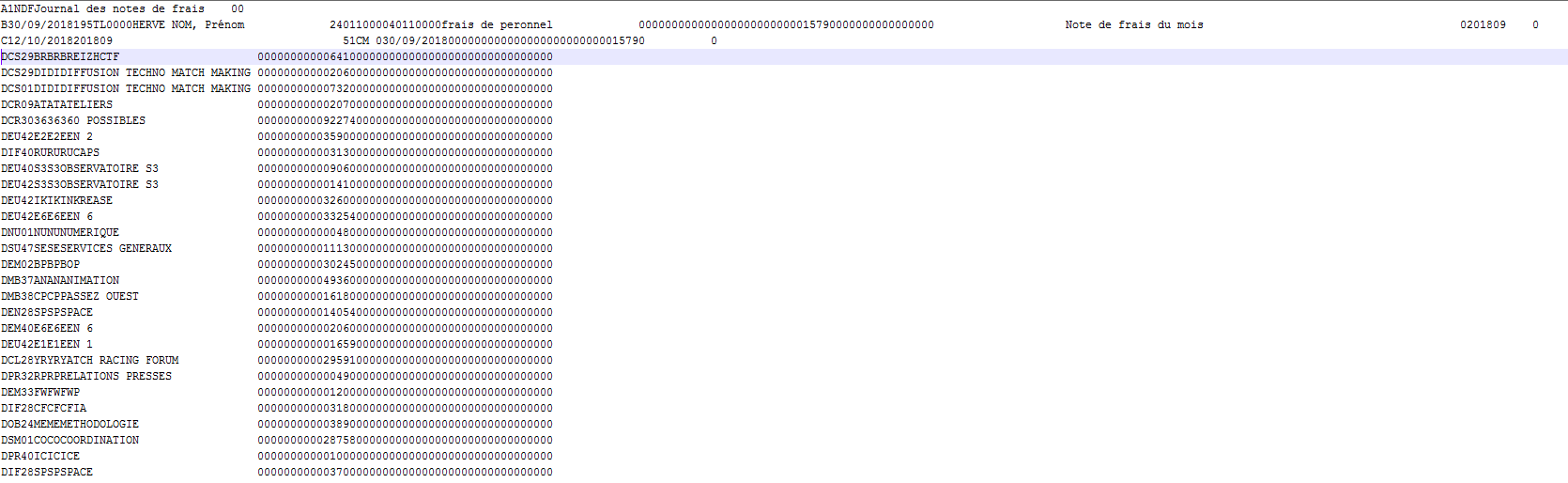

Comments
Please sign in to leave a comment.